Unicode to Bamini
Convert Tamil Unicode text into Bamini encoded text instantly.
Unicode to Bamini Converter (Tamil) – Fast, Real-Time Tool
Tamil content is mostly created in Unicode, but many printing and DTP systems still depend on Bamini tamil font. This creates a real problem—text looks perfectly fine on screen, but it breaks when used in legacy workflows or publishing environments. In these cases, unicode to bamini converter online becomes necessary.
This isn’t just a font switch. It’s a character-level mapping process that ensures the structure, spacing, and readability of Tamil text remain intact in Bamini-based formats, making it compatible with the bamini font keyboard.
Use the converter above to turn Unicode Tamil into Bamini instantly. Paste your text, convert it in real time, copy the output, and apply the font in your software to see correctly rendered Tamil for printing or publishing.
How Bamini Tamil Font Actually Works
Most people treat this as a simple “font change.” It isn’t.
Unicode Tamil stores text as true characters. Each letter has its own encoded value.
Bamini, on the other hand, is not a language encoding—it’s a keyboard-mapped font system.
That means:
- Unicode: “தமிழ்” = actual Tamil letters
- Bamini: stores key sequences like
jkpo;
So conversion is not cosmetic. It’s a re-encoding process:
- Each Unicode character is mapped to a specific Bamini key sequence
- Complex characters (like vowel signs and ligatures) must be reordered correctly
- If mapping is even slightly off, output breaks in printing
This is where weak converters fail—they don’t handle character order properly.
How to Convert Tamil Text for Bamini Use
- Paste your Tamil Unicode text into the input box
- The converter processes character mapping instantly
- Copy the output
- Apply Bamini font in your editor (Word, InDesign, PageMaker, etc.)
Important detail:
Conversion is only half the process. Display depends entirely on the font. If the font isn’t applied, the output will look like random English characters.
Example: What Changes During Conversion
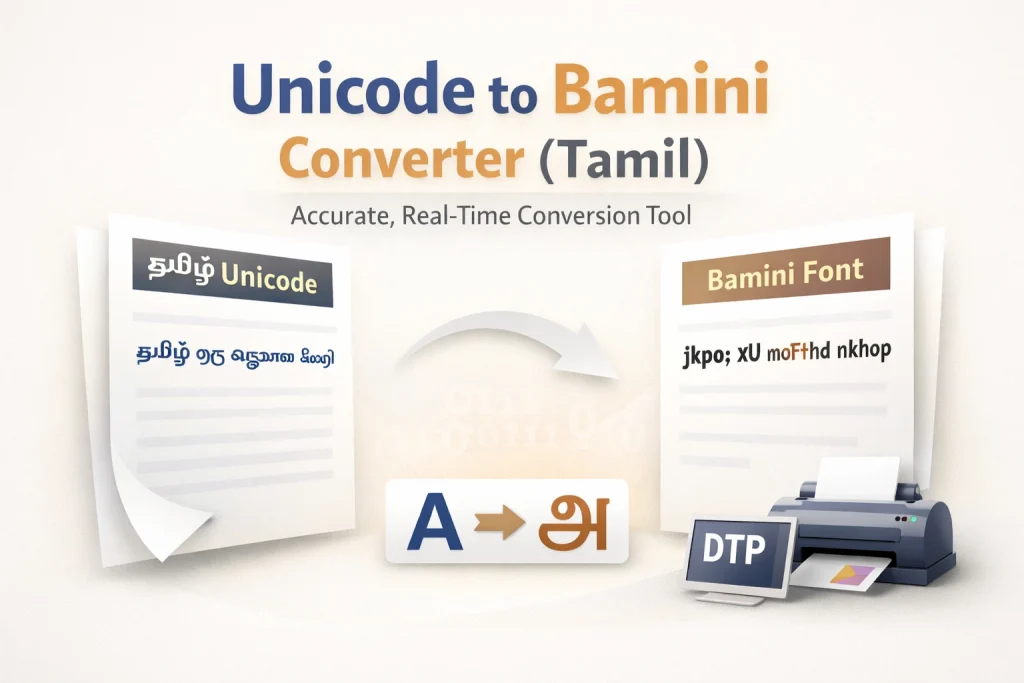
Unicode Tamil: தமிழ் ஒரு அழகான மொழி
Bamini Output: jkpo; xU moFfhd nkhop
What changed:
- The meaning did NOT change
- The visual rendering depends on font
- The internal structure shifted from Unicode encoding → Bamini key mapping
This is why direct copy-paste between systems fails without conversion.
| Aspect | Unicode Tamil Font | Bamini Font |
|---|---|---|
| Encoding | Standard (global) | Non-standard (legacy) |
| Compatibility | Works everywhere | Works only with Bamini font |
| Usage | Web, apps, mobile | Printing, DTP, legacy systems |
| Typing | Native Tamil input | Keyboard mapping |
| Portability | High | Low |
What matters in real workflows:
- Unicode is stable and universal
- Bamini is still required in specific production environments
Ignoring Bamini isn’t practical if you work with print vendors.
Where This Conversion Is Still Used
This isn’t theoretical. These are actual use cases:
1. Printing Industry
Many print shops still rely on older Tamil font systems. Files submitted in Unicode often get rejected or misrendered.
2. Desktop Publishing (DTP)
Legacy software setups (especially older PageMaker environments) expect bamini tamil font inputs.
3. Existing Document Archives
Large volumes of Tamil content—books, notices, templates—exist only in Bamini format.
4. Publisher Requirements
Some publishers explicitly request Bamini files to match their internal workflow.
In all these cases, conversion is mandatory.
Why Not Just Type in Bamini?
Because it slows everything down.
Bamini Tamil Typing Problems:
- Keyboard doesn’t match Tamil letters
- Requires memorization
- High chance of typing errors
- Editing is painful
Example:
Typing a simple Tamil word requires remembering unrelated key positions.
Better Workflow:
- Type in Unicode (normal Tamil typing)
- Convert to Bamini at the final stage
This reduces errors and speeds up production significantly.
What Makes Unicode To Bamini Converter Reliable
A basic converter maps characters. A good one handles structure.
Critical things that must work:
- Correct vowel sign positioning
- Handling of combined Tamil characters
- No duplication or loss of glyphs
- Clean output without spacing issues
- Stability across long paragraphs
Common failures in low-quality tools:
- Broken letter order
- Missing diacritics
- Inconsistent output across browsers
- Partial mapping tables
If the converter isn’t built with full mapping logic, the output becomes unusable for printing.
Common Conversion Problems & How to Fix Them
Problem 1: Output looks like random English text
Cause: Bamini font not applied
Fix: Apply the Bamini font in your software
Problem 2: Letters appear in wrong order
Cause: Poor conversion logic
Fix: Use a converter that handles Tamil character sequencing correctly
Problem 3: Text looks fine but prints incorrectly
Cause: Font mismatch in printing software
Fix: Ensure Bamini font is installed and embedded properly
Problem 4: Copy-paste breaks formatting
Cause: Unsupported environment
Fix: Use tools like MS Word, InDesign, or compatible editors
When You Should Use Unicode Instead
Not every workflow needs Bamini.
Use Unicode if:
- You’re publishing on websites
- Working with modern apps or CMS
- Sharing text digitally
- Need long-term compatibility
Use Bamini only when required by:
- Print vendors
- Legacy systems
- Existing templates
FAQs
Conclusion
This isn’t about choosing between Unicode and Bamini—it’s about using each at the right stage of your workflow. Unicode is ideal for writing, editing, and managing Tamil content because it is stable and widely supported across modern platforms. Bamini, however, is still required when working with legacy printing systems and DTP environments.
The smartest approach is simple: create and finalize your content in Unicode, then use a reliable unicode to bamini convertor only when you need output for print or older systems. This keeps your text clean, reduces errors, and avoids the frustration of working directly in a font-based system.
If you’re also working on design, social media, or creative text styles, you can explore other tools for generating styled Tamil text alongside your workflow. Combining the right tools at the right stage makes your process faster, cleaner, and far more efficient.